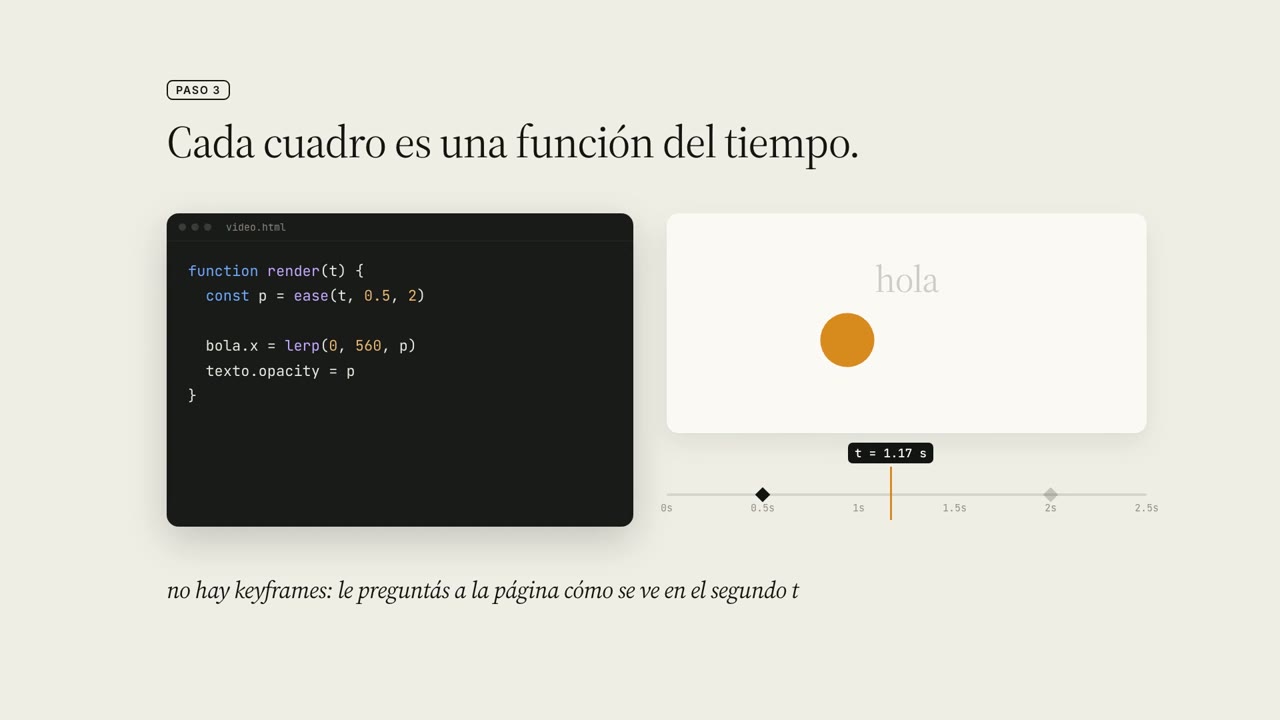
Code and timeline show every frame as a function
10.5K views · 224 likes · 295 saves · 11 reposts · Posted Sep 25, 2026 · 0:51 · Explainers
OUR NOTEA Spanish explainer on making product videos in code: step 3 pairs a render(t) function with a ball easing across a timeline, 'every frame is a function of time'; it used under 1% of a 5-hour quota.
¿Están todos al tanto de que se pueden hacer videos para sus productos con tremenda calidad en 2 segundos?
Con la nueva actualización de Opus 5.5, ahora te permite crear videos que se generan solo con código!
Esto hace que sea SÚPER barato de generar, en comparación con tener que hacer videos generativos con MiniMax, por ejemplo.
En el video de ejemplo se explica cómo se hacen estos videos.
Tambien podes pasarle links de videos de Youtube o X para tomarlos como referencia, para este ejemplo tomé algunos del X de Claude.
Pensá que, si vas a una agencia para pedir este tipo de videos, dudo que baje de $3.000.
Este video lo hice con >1% de mi cuota de 5 horas en Claude Code.THE PROMPT
The creator didn't publish a prompt for this one. The post text is below.
MAKE ONE LIKE THIS
Three steps, using what the creators in this index used.- 1 · Copy the prompt
This creator didn't share a prompt. Start from our template instead.
PROMPT TEMPLATE → - 2 · Direct it like an editor
- Ask for one self-contained HTML file on a fixed 1920×1080 stage.
- Link this video as the reference for pacing and style.
- Send two or three rounds of specific notes.
- 3 · Render it to MP4
A short piece like this can be screen-recorded, or captured frame by frame for exact timing.
TURN AN HTML ANIMATION INTO AN MP4 →
The creator didn't name their tools. Most videos like this are HTML, canvas or SVG animation written by Claude and screen-recorded or rendered to MP4 — how that works.
Indexed Sep 28, 2026, 8:28 AM · Views as of indexing. Video and post © their creator.