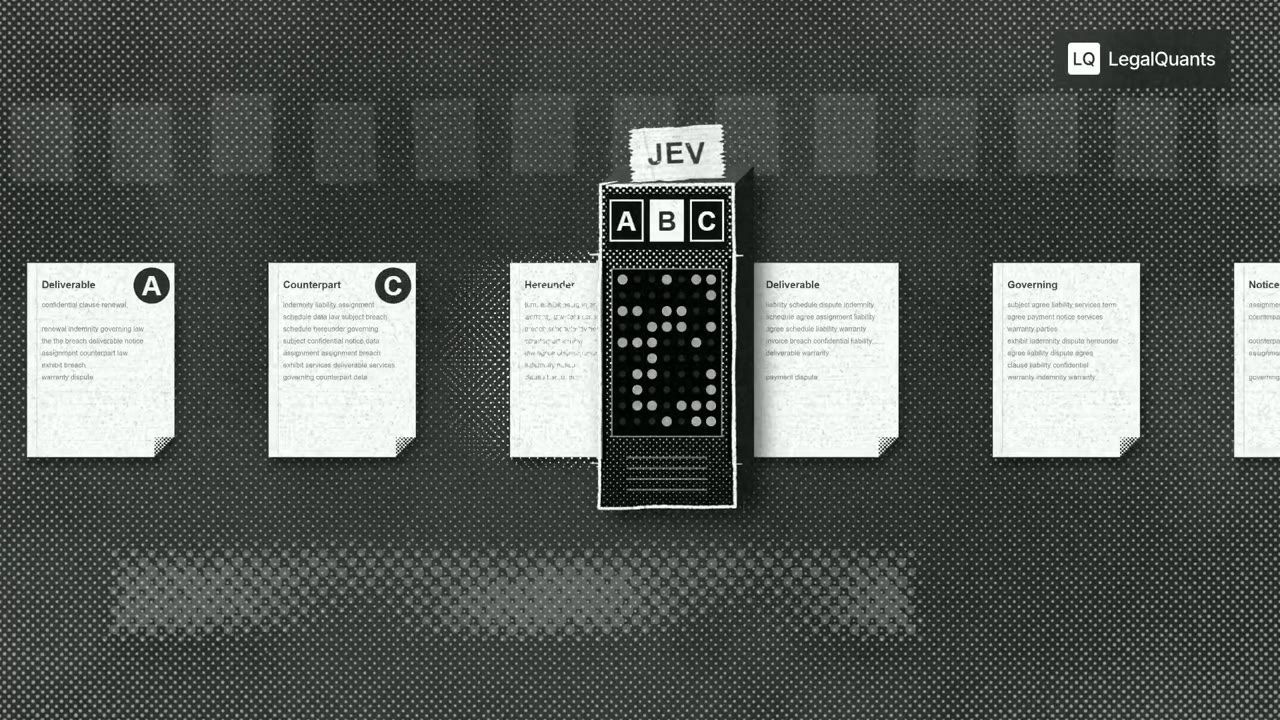
Halftone machine sorts contract clauses in a legal podcast cutaway
1.8K views · 12 likes · 19 saves · 0 reposts · Posted Sep 26, 2026 · 0:16 · Explainers
OUR NOTEA grainy black-and-white podcast animation for LegalQuants in which a lettered machine scores contract clause cards, stamps a '90% HIT' and 'kind of iffy', and filters documents through a sieve; one of 50 cutaways generated from a shared editing prompt.
I used Opus 5.5 to generate 50 podcast animations for extremely hard to visualize concepts like Jev for Legal. Absolutely blown away.
We're about to see an explosion of visual podcasts, this entire medium is about to shift
Sharing my prompt below.THE PROMPT
Podcast cutaway animation briefPartial prompt — the creator shared only part of it.
I used Opus 5.5 to generate 50 podcast animations for extremely hard to visualize concepts like Jev for Legal.  Absolutely blown away.

We're about to see an explosion of visual podcasts, this entire medium is about to shift

Sharing my prompt below.

【作者补充制作说明】
Go through the entire [episode] cut and add full-screen animations and graphics wherever they help. Be aggressive and over-inclusive: 35–50 moments, at least 2 per chapter. The goal is to fill empty talking-head time, explain ideas, and create visual hooks.

Style. Pick an aesthetic that's genuinely interesting and very, very cool, built in JavaScript with HyperFrames and assembled in Tesseract. Inspiration (all JS, no image assets):

https://x.com/Voxyz_ai/status/2102531681450119426: paper, typewriter-tape labels, hand-drawn marks
https://x.com/donaldjewkes/status/2102801274173587569: halftone, manga and pixel print, kinetic data type

Stay inside the LegalQuants brand (read brands/legalquants/): charcoal, white and black only, Arial, and the supplied lockup top-right, static. Write a shared style bible and a component kit first, so every animation looks like the same show.

Moments I definitely want:

[LIST]

Rules

Whenever anything goes full-screen (animation, screen share or still), one of us is in a corner picture-in-picture, bottom-right, following whoever is talking.
No punch-ins or zooming on the cameras. Keep each speaker relatively centered.
Copy must be verbatim or faithful to what's said. Never invent facts, numbers or quotes.
Sync each animation's beats to the spoken words.
Keep each graphic inside one uncut stretch of audio, and leave a few seconds of faces between graphics.

Process

An Opus 5.5 agent at extra-high effort finds every timestamp where an animation could fill space and hook the viewer, with a concept for each.
Opus 5.5 at medium effort builds each animation.
Opus 5.5 at extra-high effort judges each one once on brand consistency with the others, visual interest, relevance to the narrative and creative judgment.
Only cues the judge considers egregiously bad go back for a fix. No blanket redo loops.
Assemble the full cut with PiP baked into every full-screen visual, and give me a folder of the individual animations.
MAKE ONE LIKE THIS
Three steps, using what the creators in this index used.- 1 · Copy the prompt
Use the prompt above as your starting point, then change the subject and the style.
HOW OTHERS WROTE THEIRS → - 2 · Direct it like an editor
- Ask for one self-contained HTML file on a fixed 1920×1080 stage.
- Link this video as the reference for pacing and style.
- Send two or three rounds of specific notes.
- 3 · Render it to MP4
A short piece like this can be screen-recorded, or captured frame by frame for exact timing.
TURN AN HTML ANIMATION INTO AN MP4 →
The creator didn't name their tools. Most videos like this are HTML, canvas or SVG animation written by Claude and screen-recorded or rendered to MP4 — how that works.
Indexed Sep 30, 2026, 2:01 PM · Views as of indexing. Video and post © their creator.