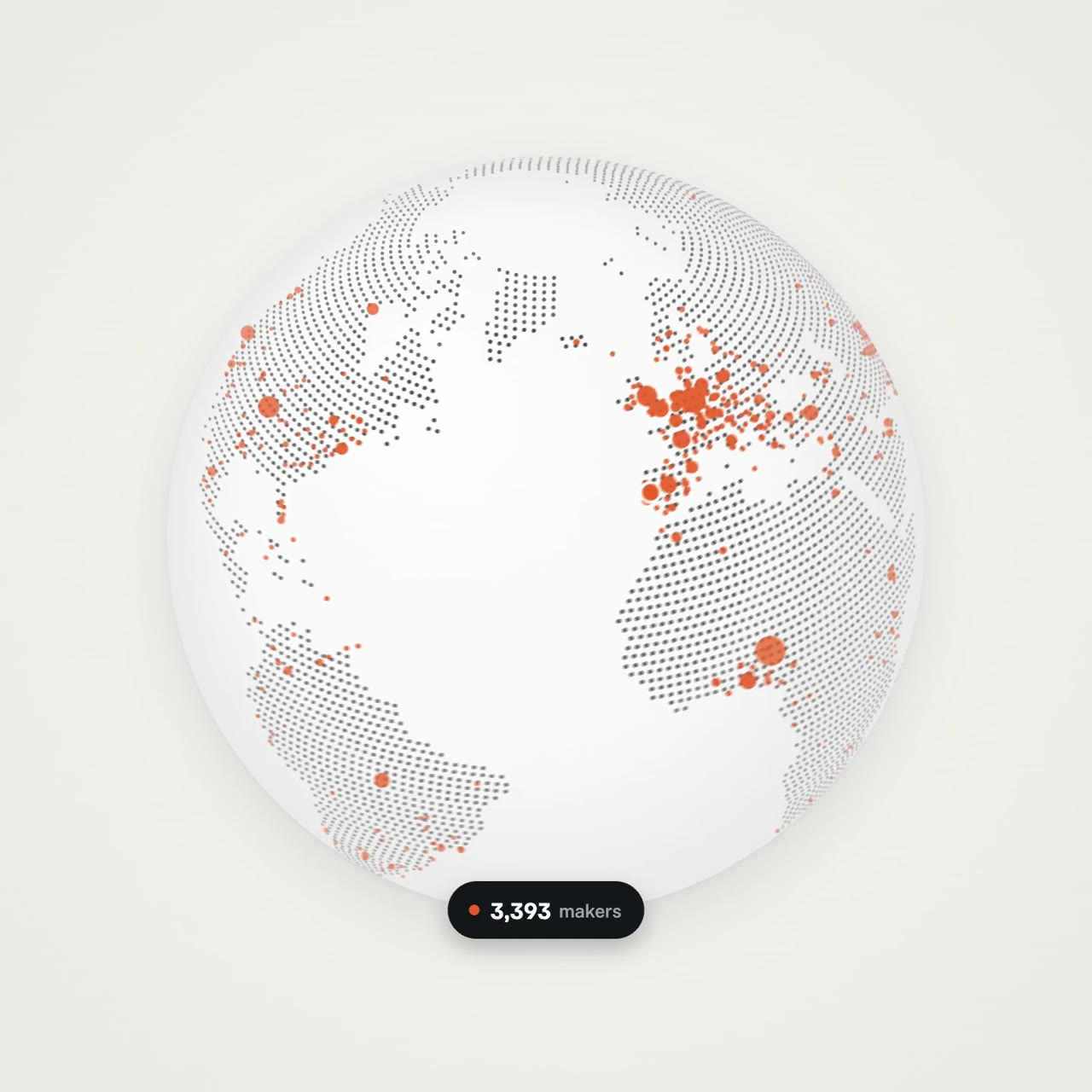
MakerMap product story morphing through app screens
Martijn VerboveVERIFIED
@verbove15.6K views · 209 likes · 336 saves · 13 reposts · Posted Sep 25, 2026 · 0:20 · Explainers
OUR NOTEA 20-second explainer for the maker-network app MakerMap where one shape morphs through sign-up, a pin, a globe filling with makers, matches and a meetup screen, generated as deterministic math in one HTML file.
THE CREATOR'S POST
Opus 5.5 is absolutely cracked at motion design
this entire video is code
0 After Effects
0 manual animation
I showed it one viral motion post and said:
“explain MakerMap, but make it insane”
it came back with 20 seconds of one shape morphing through the entire product:
sign up → your pin → 3,393 real makers lighting up the globe → matches → a meetup → search
the crazy part?
the entire animation is deterministic math
the springs, cursor, morphs and motion blur are all generated inside one HTML file
here’s the prompt structure
steal it ↓
<inputs>
Ask me for:
• my product + URL
• 8–12 UI states that tell its story
• the real data shown in each state
• brand colors + fonts + accent color
• required formats (1:1, 16:9, 9:16)
</inputs>

<rules>
One HTML file. One canvas
One draw(t) function

No CSS transitions
No timers
No state carried between frames

One shape, never cut

Every state is the same element changing size, radius and color while the content swaps

A cursor drives the sequence with real clicks, typing and one drag

Real UI. Real data. No placeholders.

</rules>
<structure>
120 BPM grid

Something happens on every bea

logo → button → handle field → “is this you?” → loader → pin → globe filling with users → matches → tabs → RSVP → search → logo

</structure>

<motion>
Closed-form springs everywhere with only a tiny overshoot.

If a value changes target multiple times, sum one spring per change

Content enters after its container starts morphing and leaves before the next morph so text never overlaps

Use a short blur on transitions

Never fade black directly into the accent color. Move an accent element between states instead

Make tab indicators stretch by putting each edge on a different spring

Zoom the camera so every state fills the frame

Make the last frame equal the first so the whole thing loops
</motion>

<export>
First render one frame per beat as a contact sheet

Fix anything cramped or broken

Then render every frame in headless Chrome at 60fps, averaging 6 subframes for motion blur

Pipe into ffmpeg:
H.264 + yuv420p

Export all aspect ratios in parallel
</export>

motion design is becoming a promptTHE PROMPT
Structured product-explainer brief<inputs>
Ask me for:
• my product + URL
• 8–12 UI states that tell its story
• the real data shown in each state
• brand colors + fonts + accent color
• required formats (1:1, 16:9, 9:16)
</inputs>
<rules>
One HTML file. One canvas
One draw(t) function
No CSS transitions
No timers
No state carried between frames
One shape, never cut
Every state is the same element changing size, radius and color while the content swaps
A cursor drives the sequence with real clicks, typing and one drag
Real UI. Real data. No placeholders.
</rules>
<structure>
120 BPM grid
Something happens on every bea
logo → button → handle field → “is this you?” → loader → pin → globe filling with users → matches → tabs → RSVP → search → logo
</structure>
<motion>
Closed-form springs everywhere with only a tiny overshoot.
If a value changes target multiple times, sum one spring per change
Content enters after its container starts morphing and leaves before the next morph so text never overlaps
Use a short blur on transitions
Never fade black directly into the accent color. Move an accent element between states instead
Make tab indicators stretch by putting each edge on a different spring
Zoom the camera so every state fills the frame
Make the last frame equal the first so the whole thing loops
</motion>
<export>
First render one frame per beat as a contact sheet
Fix anything cramped or broken
Then render every frame in headless Chrome at 60fps, averaging 6 subframes for motion blur
Pipe into ffmpeg:
H.264 + yuv420p
Export all aspect ratios in parallel
</export>
motion design is becoming a promptMAKE ONE LIKE THIS
Three steps, using what the creators in this index used.- 1 · Copy the prompt
Use the prompt above as your starting point, then change the subject and the style.
HOW OTHERS WROTE THEIRS → - 2 · Direct it like an editor
- Ask for one self-contained HTML file on a fixed 1920×1080 stage.
- Link this video as the reference for pacing and style.
- Send two or three rounds of specific notes.
- 3 · Render it to MP4
A short piece like this can be screen-recorded, or captured frame by frame for exact timing.
TURN AN HTML ANIMATION INTO AN MP4 →
HOW IT WAS MADE
The creator didn't name their tools. Most videos like this are HTML, canvas or SVG animation written by Claude and screen-recorded or rendered to MP4 — how that works.
LOOK
ui-mockupkinetic-typeexplainer
Indexed Sep 28, 2026, 8:28 AM · Views as of indexing. Video and post © their creator.